 🐑 PALWORLD 1.0: We're ready day one — crossplay servers for PC, Xbox, PS5 & Mac.
 Host
HostPalworld
Your Pals deserve a home that never sleeps — with full crossplay, friends on PC, Xbox, PS5, and Mac can all play on the same server. Fast Ryzen cores, NVMe drives, and save backups every 2 hours. Grab your friends and catch some Pals!
One plan, fully configurable
6GB RAM
1-8 playersReady for Palworld 1.0 — and everything after
We keep our Palworld servers current with every update, so your world is ready the moment a new patch drops. Here's what's already built in:
Full console crossplay
PC (Steam & Game Pass), Xbox, PS5, and Mac — everyone on the same server. Consoles can't type in an IP address, so we added a one-click Community Server toggle that lists your server in Palworld's in-game browser where console friends can find and join it.
Your server stays unlisted and private by default, and a crossplay dropdown lets you control exactly who can join: everyone, PC-only, console-only, or a single platform.
Every setting, no config files
All 90+ Palworld world settings — XP rates, capture rates, day/night speed, raids, guild limits, hardcore mode, the works — are editable right from the Nitro Panel.
Settings are organized into sensible groups with dropdowns and toggles instead of type-it-yourself text, and they apply automatically every time your server starts.
Your progress is safe
Palworld only reliably saves on a clean shutdown — so stopping or restarting from the panel gives the server a 15-second warning, saves the world properly, then exits. No lost progress.
On top of that, we take backups of your saves every 2 hours automatically.
Day-one updates, every time
Our Palworld platform is fully refreshed and ready for 1.0. When Palworld updates, your server gets the new version fast — no waiting around while your friends play without you.
Guides for console crossplay and a full settings reference live in our docs.

The Nitro Panel
Based on Pterodactyl.io, our control panel is packed with features and style, helping you control your server with ease and precision.
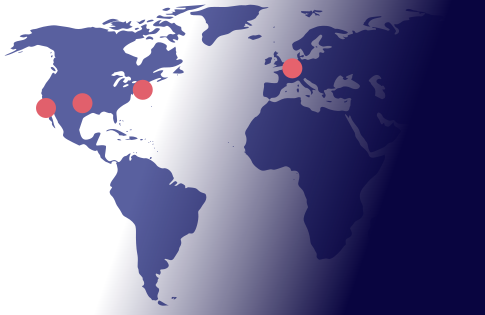
Four Locations
We have three locations throughout the United states, and one based in Falkenstein, Germany. Check your ping against our locations to decide on which is best for your server.
Getting started is easy
Select a Plan
Choose the right plan for your gaming session. This may be based on the number of players joining your server or the amount of resources the game and you will need.
Choose a Location
Depending on where you and your friends are playing from, select a location that is best for you. You can easily check your ping before buying to see the ping time of the connection from your location.
Select a billing Cycle
Choose to pay monthly, or receive a discount on quarterly, semi-annual, or yearly payment plans
Review the Specs
Review the options for Port, Memory and CPU Cores and select different options to customize the server for your gaming experience. Lots of friends joining you? You may want to increase the RAM accordingly.
Pick a Name and Complete your transaction
Name your server so your friends can find and connect to your game easily. Complete your purchase and you will receive an email within minutes with links to your server and Nitro Panel
Customize on the fly
Need to add another Gig of RAM, or add an extra CPU core? You can add/remove resources to your server at any time through our Billing Portal. No server restart needed!
Rated 4.6/5 on Trustpilot